
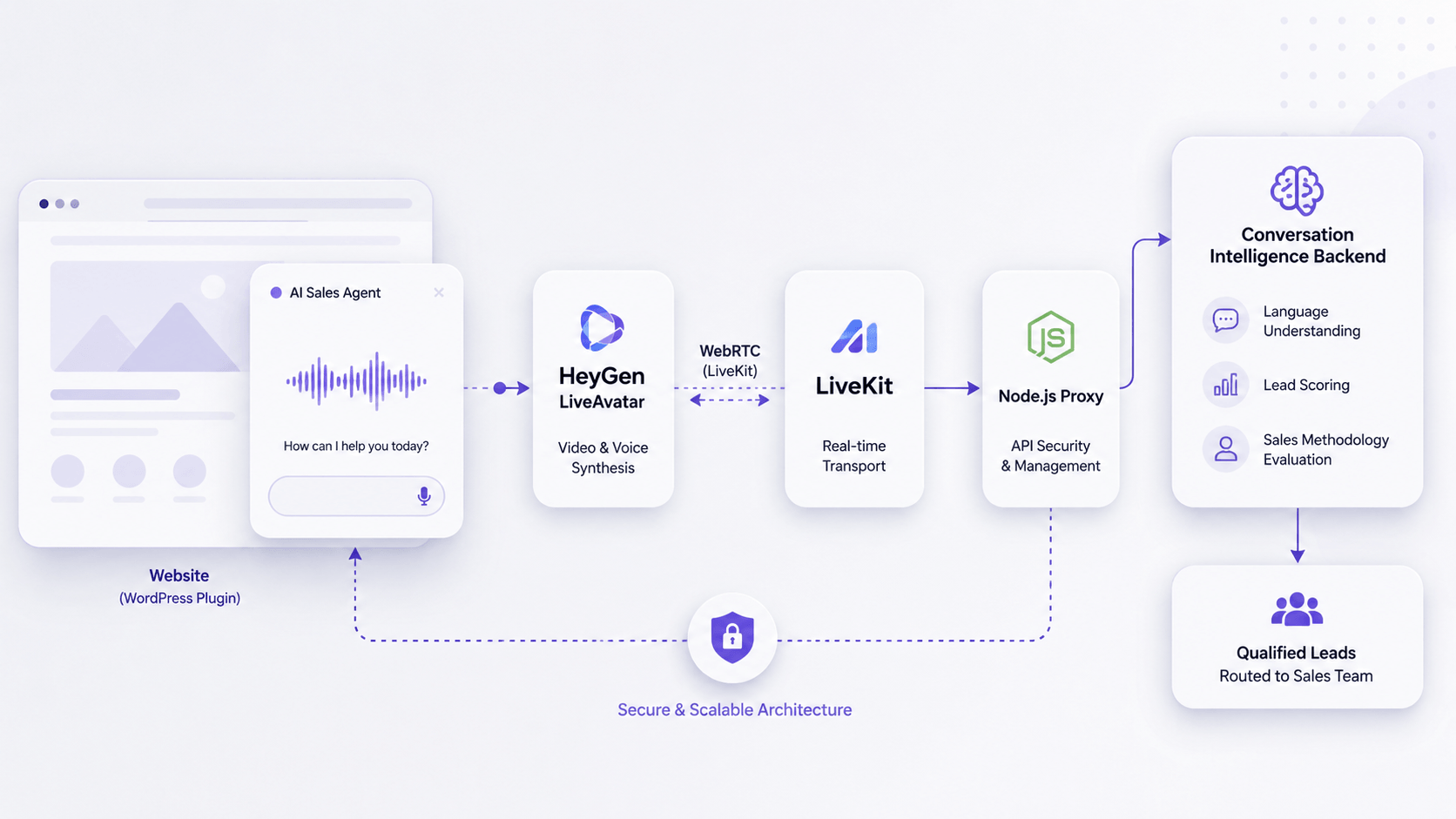
This case study describes how we investigated and resolved production failures in an AI-powered sales agent using HeyGen LiveAvatar, LiveKit, WebRTC, and custom conversation intelligence services.
A client in the B2B SaaS sector came to us with a deceptively simple complaint: their AI-powered sales avatar worked perfectly in short demos, but in real conversations with prospects it would freeze, start speaking unnaturally fast, and eventually stop responding altogether. Visitors were abandoning sessions without completing the qualification flow the product was built around.
The avatar had been running in production for months. The engineering team had already made several fixes. Nothing had helped.
This is the story of how we found what was actually wrong.
An AI sales agent is a conversational AI system designed to engage website visitors, qualify leads, answer questions, and guide prospects through the early stages of the sales process without human intervention.
Unlike traditional chatbots, modern AI sales agents combine natural language processing, voice interaction, real-time media streaming, and business-specific qualification logic. In this project, the system relied on a HeyGen LiveAvatar for visual interaction, LiveKit for real-time communication, and a custom conversation intelligence engine responsible for lead qualification and routing.
While these systems can deliver impressive user experiences, they also introduce unique testing and reliability challenges that often appear only in production environments.
This case study shows how we investigated and fixed production failures in a real-time AI sales avatar using HeyGen LiveAvatar, LiveKit, WebRTC, a Node.js proxy, and a custom conversation intelligence backend.
The product
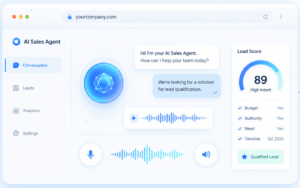
The client had built a digital sales agent — an AI avatar embedded directly on their website that qualifies B2B leads through natural conversation. Visitors speak to it, it responds in real time with synchronized lip movements and voice, it asks discovery questions, scores the prospect against a sales methodology, and routes qualified leads to the sales team.
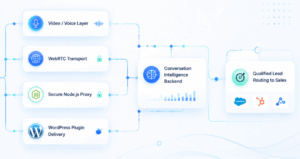
The technology stack behind it: a HeyGen LiveAvatar for the video/voice layer, LiveKit as the WebRTC transport, a custom Node.js proxy to protect API credentials, and a WordPress plugin as the delivery mechanism. On top of that, a separate conversation intelligence backend handling the actual language understanding and lead scoring.
An impressive integration of several moving parts. Which, as it turned out, was part of the problem.
What we were told
“After about 10–15 minutes, the avatar freezes and stops responding. Sometimes the voice speeds up before it dies. We’ve tried increasing the timeout settings. Nothing works.”
Our first instinct: this sounds like a session lifecycle issue. Streaming avatar platforms typically have idle timeout defaults that are far too aggressive for real sales conversations. We’ve seen this pattern before with HeyGen’s older Interactive Avatar API.
Our first instinct was wrong. Or rather — it was only one-seventh right.
The investigation
We began with what we always begin with when debugging production behavior that can’t be reproduced on demand: instrument everything and watch what actually happens.
Step one: network telemetry. We built a lightweight fetch interceptor that logged every API call the widget made — endpoint, response time, HTTP status, timestamp. Then we ran a real 15-minute conversation with the avatar and extracted the results.
What we found immediately was telling. The widget was calling a session keep-alive endpoint every 60 seconds. In the last minutes of the session, those calls were returning HTTP 500. The widget code didn’t check the response status. It just kept calling. For over five minutes, the widget was faithfully pinging a dead session while showing the visitor a frozen avatar, with no error, no reconnect attempt, and no UI signal of any kind.
Step two: WebRTC telemetry. We captured a full chrome://webrtc-internals dump during a test session — 180 minutes of raw WebRTC statistics, 1952 getStats snapshots, across two peer connections. We decoded the dump offline with a Python analysis script.
The numbers were striking. Between minutes 15 and 17 of the session, the browser’s audio jitter buffer went into sustained distress: samples were being removed at 3,330 per second (the audio speeding up — the “chipmunk effect” the client described), then inserted at 4,905 per second (the audio slowing down as the buffer tried to compensate). Jitter buffer delay spiked from a healthy 50 milliseconds to 371 milliseconds. Three video freezes occurred, totaling 1.22 seconds. Three audio interruptions, totaling 1.08 seconds.
And crucially: zero packet loss. Not a single packet was dropped on the wire. The network was delivering everything. The problem was in the timing of delivery — packets arriving in bursts rather than at steady intervals, causing the browser’s NetEQ algorithm to thrash between acceleration and deceleration.
At minute 20, the media stream collapsed entirely. The video element’s srcObject still existed, but contained zero tracks. currentTime froze at 1,199 seconds and didn’t advance for the next three minutes of monitoring. The avatar looked mounted but was broadcasting nothing.
Step three: source code review. The client shared both codebases — the proxy server and the frontend widget. Reading the source with the telemetry in hand, the bugs assembled themselves into a coherent picture.
Investigating the Failure
Rather than treating the issue as a simple frontend defect, we approached it as a distributed systems problem.
The AI avatar experience depended on several independent components:
| Component | Responsibility |
|---|---|
| HeyGen LiveAvatar | Real-time avatar rendering |
| LiveKit | WebRTC transport layer |
| Node.js Proxy | API security and request routing |
| Conversation Intelligence Engine | Lead qualification and conversational logic |
| Browser Runtime | Session lifecycle and resource management |
Any one of these layers could potentially introduce latency, state inconsistencies, or silent failures that would only appear during real user sessions.
What we found
Seven distinct bugs, each contributing to the failure in a different way.
The most impactful was not where we expected it. In the frontend widget’s main.js, there was an event listener on visibilitychange — the browser event that fires when a user switches tabs or minimizes the window:
document.addEventListener(‘visibilitychange’, function () {
if (document.hidden && sellEmbeddedApi) {
sellEmbeddedApi.completeUserConversation();
}
});
completeUserConversation() makes a PATCH request to the conversation backend marking the session as completed, then sets the local conversation ID to null. After that, every subsequent message the visitor sends is silently dropped by the widget with a console warning that the visitor never sees.
This fires every time the visitor glances at another tab. In a 15-minute sales qualification conversation, the probability of never switching tabs approaches zero. The conversation backend was being silently terminated mid-session on essentially every real visitor interaction.
WebRTC Diagnostics and Session Analysis
To isolate the source of the problem, we collected browser logs, WebRTC statistics, session lifecycle events, and infrastructure telemetry across multiple user journeys.
Particular attention was given to:
– Connection state transitions;
– Browser visibility changes;
– Media stream health;
– Session timeout behavior;
– Reconnection events;
– Long-duration conversations
This approach allowed us to move beyond assumptions and identify exactly where communication between system components was breaking down.
The remaining six bugs fell into three categories:
Session lifecycle gaps. The keep-alive function in avatar.js fetched the keep-alive endpoint but never read the response. HTTP 200 and HTTP 500 were treated identically — the function exited without doing anything. The onDisconnect callback, called when the LiveKit room disconnects, had an empty function body. The onTrackUnsubscribe handler removed departing media tracks from the stream but never checked whether the stream was now empty.
Error classification collapse. The proxy server’s catch blocks converted every upstream error — whether a temporary network blip, a rate limit, or a terminal “session no longer exists” — into HTTP 500 with no distinguishing information. The widget couldn’t know whether to retry, refresh the token, or reinitialize the whole session, because the proxy wasn’t telling it.
Missing configuration. The LiveAvatar session was being created without an explicit activity_idle_timeout parameter. The platform default is 120 seconds. Avatar speech does not count as user activity — only visitor input does. So whenever the avatar gave a long response and the visitor listened silently for more than two minutes, the upstream session auto-closed. This explained the client’s other reported symptom: the avatar dying specifically when the visitor paused before asking a follow-up question.
There was also a language configuration bug: the Web Speech API used for voice input had its language hardcoded to en-US. Visitors speaking Bulgarian (the primary target market) were being transcribed through an English language model, producing near-random output that the conversation backend was trying — and mostly failing — to make sense of.
What we built
The investigation produced three layers of fixes.
The proxy server received error classification logic that maps upstream HTTP status codes to a stable client-facing contract: 410 for terminal session failures, 401 for authentication issues, 5xx for transient errors. It also received upstream request timeouts (previously absent, meaning a hung upstream request would block indefinitely), and the activity_idle_timeout parameter is now set to 3,599 seconds at session creation — just under the platform maximum — so the upstream session outlasts any realistic sales conversation.
The frontend widget received a session recovery architecture. The empty onDisconnect handler now dispatches a custom avatarSessionLost event. The onTrackUnsubscribe handler detects when all media tracks have departed and dispatches the same event. A 5-second watchdog interval checks for the ghost state — a mounted video element with zero active tracks — and dispatches it as well. A centralized handler listens for avatarSessionLost, stops the keep-alive loop, tears down the avatar cleanly, shows a “reconnecting” status, and attempts up to three restarts with exponential backoff, all without touching the conversation state on the backend.
The keep-alive function was rewritten to inspect response status and react accordingly: reset the error counter on 200, dispatch avatarSessionLost on 410 or 401, track consecutive transient failures and escalate after three in a row. The keep-alive interval was reduced from 60 seconds to 30, providing a safety margin against the tighter idle timeout windows that some deployment environments impose.
The visibilitychange handler was removed. The conversation is now terminated only on genuine page exit, using sendBeacon for reliability during the beforeunload event — fetch() is aborted by the browser during page unload and was already silently failing in the original implementation.
The speech recognition layer was made language-aware. Rather than hardcoding en-US, the widget now resolves language through a three-tier chain: the per-account language setting from the backend (highest priority, allows per-tenant configuration), the visitor’s browser locale from navigator.language (automatic detection for international deployments), and en-US as a final fallback. The language setting flows through to the LiveAvatar session token as well, so both the speech recognition and the avatar’s TTS voice align with the resolved language.
What the numbers look like now
The proxy’s keep-alive endpoint, which was averaging 507 milliseconds of response latency in our test, is no longer in the critical path for session continuity — the session will survive a missed ping without timing out. When keep-alive does fail terminally, the widget responds within one polling cycle rather than five-plus minutes later.
The conversation backend now receives coherent transcripts from Bulgarian-speaking visitors. The sales qualification data that was previously garbage is now meaningful input to the scoring model.
The ghost state — avatar frozen, tracks gone, UI showing nothing, visitor confused — no longer persists indefinitely. It is detected within five seconds and triggers an automatic recovery.
What we recommended beyond the fixes
The investigation also surfaced a structural observation worth sharing with the client’s leadership team.
The current architecture has five layers that the team owns and maintains: a plugin, a JavaScript widget with custom session lifecycle management, an Express proxy server, a conversation intelligence backend, and an integration with the LiveAvatar platform. The widget reimplements, manually and incompletely, the same session lifecycle that HeyGen’s official @heygen/liveavatar-web-sdk handles out of the box. The proxy reimplements credential proxying that only needs to exist for the single endpoint that requires an API key — the other session endpoints operate on a scoped session token that’s safe to use directly from the browser.
This isn’t a criticism of the original decisions. The widget appears to have been built before the official SDK existed, during HeyGen’s Interactive Avatar-to-LiveAvatar transition. The proxy was the right call when there was no better option. But the platform has moved faster than the integration, and the result is that the team is maintaining code that vendors now maintain for them — imperfectly, because no team has the same depth of production feedback that a vendor’s SDK team accumulates from thousands of integrations.
We put together a phased migration path: add observability first (so future failures surface from real visitor sessions, not from manual debugging), replace the custom avatar lifecycle code with the official SDK, simplify the proxy to a single token-mint endpoint, and eventually move the conversation orchestration to a proper agent framework (LiveKit Agents) running server-side. Each phase delivers independent value. None requires rewriting the product.
The broader lesson
This case is a good illustration of something we see regularly: AI-powered products that work perfectly in controlled environments and degrade unpredictably in the wild. The failure modes are almost never where people expect them.
The client’s engineering team had focused their debugging efforts on the obvious suspect — the streaming avatar platform itself. And there was a real issue there: the sender-side delivery jitter we measured in the WebRTC stats dump is worth a support ticket to HeyGen. But it was seventh on the list of things causing production sessions to fail, not first.
The first six were in code the client owned. An empty function body. A missing response status check. A session creation call missing one parameter. A language string that never got updated after an early prototype. An event listener that made sense in isolation and was catastrophic in a real user session.
Finding these things required treating the system as a system — not debugging components in isolation, but observing the full request lifecycle under real conditions, capturing telemetry at the transport layer, correlating browser-side data with server-side logs, and reading the code knowing what the data had already told us to look for.
That combination — structured testing methodology applied to AI infrastructure — is increasingly what separates products that work at scale from products that work in demos.
Lessons Learned
This investigation reinforced several important principles for testing AI-powered applications:
1. Demos Are Not Production
Short demonstrations rarely expose the edge cases that emerge during extended user sessions.
2. AI Systems Are Distributed Systems
Even when the AI model performs correctly, failures in streaming, networking, or session management can break the user experience.
3. Browser Behavior Matters
Modern browsers aggressively optimize inactive tabs and background processes, which can affect real-time AI applications.
4. Monitoring Is Essential
Without detailed telemetry and observability, identifying intermittent failures becomes significantly more difficult.
5. Reliability Is Part of User Experience
Users do not distinguish between an AI failure and an infrastructure failure. If the avatar stops responding, the experience is broken regardless of the root cause.
Testing AI Systems Beyond Model Accuracy
Many organizations focus heavily on evaluating model performance while overlooking the surrounding infrastructure that enables AI interactions.
In practice, production reliability depends on much more than prompt quality or model selection. Real-world AI applications must withstand browser limitations, network interruptions, session lifecycle events, third-party service failures, and unexpected user behavior.
Effective AI quality assurance therefore requires a holistic testing strategy that validates both the intelligence layer and the systems that support it.
As this project demonstrated, the most impactful failures are often found outside the AI model itself. If your AI product works in demos but fails in production, SQA.bg can help you identify where the system actually breaks — across frontend behavior, backend services, WebRTC communication, third-party APIs, and real user journeys.
Need help testing AI systems in production?
At SQA.bg, we help companies validate AI-powered products, conversational interfaces, real-time applications, and complex distributed systems before production issues impact customers.Whether you’re building AI avatars, voice assistants, customer support bots, or lead qualification platforms, we can help uncover the failures that traditional testing often misses.